Asus ROG Strix Scar 18: The Ultimate Gaming Laptop Deep Dive
If you’ve been shopping for a high-end gaming laptop lately, chances are the Asus ROG Strix Scar 18 has already crossed your radar. It’s the kind of machine that doesn’t just play games it dominates them. With a massive 18-inch Mini LED display, top-tier Intel and Nvidia hardware, and a design built for serious performance rather than portability, the Scar 18 has become one of the most talked-about laptops in the gaming community.
In this article, we’ll break down everything you need to know about the Asus ROG Strix Scar 18: its specs, real-world performance, design choices, pricing, and how it stacks up against competitors like the Lenovo Legion 7i. We’ll also touch on how it compares to workstation-class machines like the HP ZBook Firefly G11 for buyers who split their time between gaming and professional work. By the end, you’ll know exactly whether this laptop deserves a spot on your desk.
What Is the Asus ROG Strix Scar 18?
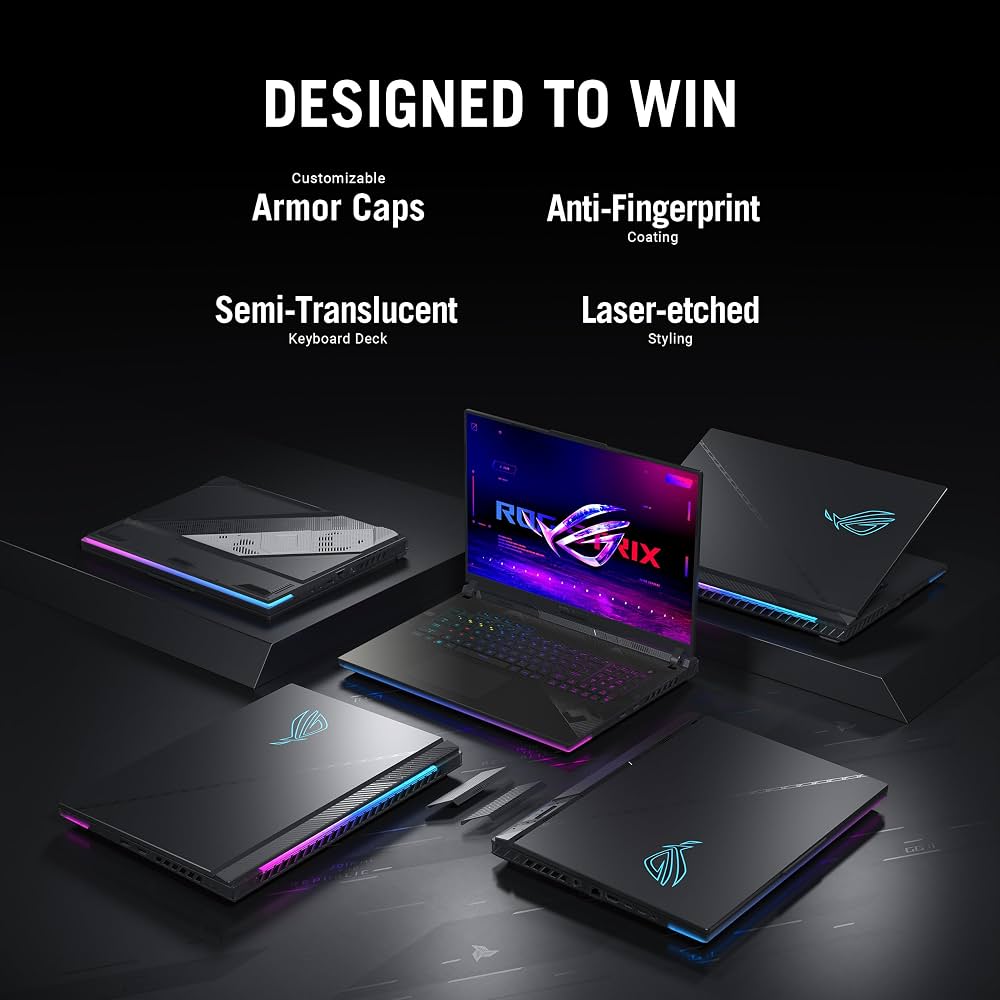
The ROG Strix Scar 18 is Asus’s flagship gaming laptop, sitting at the very top of the Republic of Gamers lineup. It’s built for gamers and content creators who want desktop-level performance in a portable (if heavy) chassis. The current generation pairs Intel’s Core Ultra 9 processors with Nvidia’s RTX 50-series graphics cards, all wrapped in Asus’s signature aggressive gaming aesthetic complete with RGB lighting, an illuminated ROG logo, and the brand’s distinctive AniMe Vision lighting on the lid.
Unlike thinner “gaming-lite” laptops that compromise on power to save weight, the Scar 18 leans fully into performance. It’s not designed to slip into a backpack for a coffee-shop work session it’s designed to be a portable battlestation.
Key Specifications
Here’s a look at what you can expect from a well-equipped Scar 18 configuration:
Processor and Graphics
- CPU: Intel Core Ultra 9 290HX Plus (24 cores, 24 threads, boosting up to 5.5GHz)
- GPU: Up to Nvidia GeForce RTX 5090 Laptop GPU, with RTX 5080 and RTX 5070 Ti options available at lower price points
- NPU: Intel AI Boost NPU delivering up to 13 TOPS for on-device AI tasks
Display
- Screen size: 18 inches
- Resolution options: Up to UHD+ (3840 x 2400) Mini LED, with a 2560 x 1600 240Hz panel also available
- Brightness: Peak HDR brightness up to 1,600 nits on top configurations, meeting DisplayHDR 1000 certification
- Refresh rate: 240Hz across most configurations, ideal for competitive and fast-paced titles
Memory and Storage
- Configurations ranging from 16GB up to 128GB of RAM
- Storage options from 1TB up to 4TB of PCIe NVMe SSD storage
- Tool-free access panels let you upgrade RAM, SSDs, and fans without a screwdriver
Cooling and Build
- A vapor chamber roughly 20% larger than the previous generation
- Tri-Fan cooling technology offering significantly more airflow than earlier models
- Conductonaut Extreme liquid metal applied to both CPU and GPU for sustained performance under load
Ports and Connectivity
- Dual Thunderbolt 5 ports
- Multiple USB 3.2 Gen 2 Type-A ports
- HDMI 2.1 FRL
- 2.5G LAN port
- Wi-Fi 7 support
Dimensions and Weight
The Scar 18 measures roughly 15.7 x 11.7 x 1.4 inches and weighs around 8.16 pounds, making it one of the heaviest laptops in its class. This is a trade-off Asus deliberately makes prioritizing cooling capacity and raw performance over portability.
Pricing
Pricing varies significantly depending on configuration. Entry-level models with RTX 5070 Ti graphics and smaller storage start in the $2,700–$3,300 range, while mid-tier configurations with RTX 5080 graphics land around $3,300–$4,300. Fully loaded models with the RTX 5090, maximum RAM, and largest SSD capacity can reach $4,999 or higher.
Real-World Performance
In hands-on testing, reviewers have consistently praised the Scar 18’s ability to sustain high performance under prolonged gaming loads, largely thanks to its oversized cooling system. The combination of a larger vapor chamber and liquid metal thermal compound allows the CPU and GPU to maintain higher clock speeds for longer periods compared to thinner competitors.
The Mini LED display is frequently singled out as one of the best gaming panels available on a laptop today, with reviewers highlighting its contrast, brightness, and color accuracy as standout features though some note that at nearly $5,000 as tested, it needs to justify that price against rivals like Razer’s Blade 18.
How Does It Compare to the Lenovo Legion 7i?
The Lenovo Legion 7i is one of the Scar 18’s closest rivals, though the two laptops take different approaches. The Legion 7i is built around a more compact 16-inch chassis weighing under 2 kilograms, making it far more portable than the Scar 18. It pairs Intel Core Ultra 9 processors with Nvidia RTX 5070 graphics and a vivid 16-inch OLED display running at up to 240Hz.
The trade-off is clear: the Legion 7i caps out at the RTX 5070, while the Scar 18 can be configured with the significantly more powerful RTX 5090. If raw gaming performance and a larger, brighter display are your priorities, the Scar 18 pulls ahead. If portability, OLED contrast, and a lighter travel footprint matter more, the Legion 7i is the more practical choice for gamers who move around frequently.
What About Productivity and Creator Work?
Gamers aren’t the only ones eyeing high-performance laptops like the Scar 18. Creators and professionals often compare gaming laptops to workstation-class machines such as the HP ZBook Firefly G11. The ZBook Firefly line is built for business and creative professionals who need ISV-certified reliability, longer battery life, and a more understated design rather than RGB lighting and gaming aesthetics.
If your priority is color-accurate professional workflows, long battery life, and a business-appropriate design, a ZBook-style workstation is the better fit. But if you want maximum gaming performance with enough horsepower to also handle video editing, 3D rendering, or AI workloads on the side, the Scar 18’s raw GPU power gives it a clear advantage for hybrid gaming-and-creation use cases.
Case Study: Who Should Actually Buy the Scar 18?
Consider two hypothetical buyers:
The Competitive Gamer: Someone who streams and plays competitive shooters will benefit enormously from the 240Hz refresh rate and the RTX 5090’s ability to push high frame rates even at demanding settings. The large 18-inch screen also makes it easier to spot details in-game.
The Hybrid Creator-Gamer: A video editor who also games in their downtime will appreciate the Mini LED display’s color accuracy and the GPU headroom for rendering projects faster than a mid-range laptop could manage.
In both cases, the laptop’s weight and size are the main compromise this isn’t a machine you’ll want to carry to a coffee shop daily, but for a desk-based setup with occasional travel, it delivers exceptional value for the performance on offer.
Pros and Cons
Pros
- Exceptional raw performance with up to RTX 5090 graphics
- Outstanding Mini LED display with high brightness and contrast
- Strong sustained performance thanks to superior cooling design
- Tool-free upgradeability for RAM and storage
- Dual Thunderbolt 5 ports for future-proof connectivity
Cons
- Very heavy and bulky compared to most gaming laptops
- Premium configurations can exceed $4,500–$5,000
- Battery life is limited when compared to thinner ultrabooks
- Not ideal for frequent travelers or minimalist setups
Frequently Asked Questions
Is the Asus ROG Strix Scar 18 good for gaming in 2026? Yes. With up to an RTX 5090 GPU, a 240Hz Mini LED display, and strong sustained thermal performance, it remains one of the most powerful gaming laptops available.
How does the Scar 18 compare to the Lenovo Legion 7i? The Scar 18 offers significantly higher-end GPU options and a larger display, while the Legion 7i is lighter, more portable, and features a vivid OLED panel though capped at the RTX 5070.
Is the Scar 18 good for work, not just gaming? It can handle demanding creative workloads like video editing and rendering well, though professionals who need long battery life and a business-focused design may prefer something closer to the HP ZBook Firefly G11.
What’s the biggest downside of the Scar 18? Its weight. At over 8 pounds, it’s one of the heaviest laptops in its category, making it far less portable than rivals like the Legion 7i.
Is it worth the price? For gamers who want top-tier performance and are willing to trade portability for power, most reviewers agree the Scar 18 justifies its price particularly in mid-tier RTX 5080 configurations that balance cost and performance well.
Final Thoughts
The Asus ROG Strix Scar 18 is a laptop built for one purpose: uncompromising gaming performance. Its massive Mini LED display, powerful RTX 50-series graphics options, and robust cooling system make it one of the standout gaming laptops of the year. It’s not the machine for someone chasing portability that’s where laptops like the Lenovo Legion 7i make more sense but for gamers and creators who want desktop-class power in a laptop form factor, the Scar 18 delivers.
If you’re weighing your options between the Scar 18, the Legion 7i, or even a workstation like the HP ZBook Firefly G11, think carefully about what matters most to you: raw performance, portability, or professional reliability. Each laptop shines in a different scenario.
What’s your take? Have you used the Scar 18 or are you considering it for your next upgrade? Drop a comment below with your thoughts, share this article with fellow gamers weighing their options, and let us know which laptop you’d choose.